Showing posts with label pc-soft. Show all posts

Thursday, July 25, 2019

What is computer memory?

Posted by Bit Version

Memory and Storage 

You can store data on your hard disk, while data which is being processed is stored in RAM (Random Access Memory) Data which is stored on a hard disk can be permanent, while data in RAM is only temporary. Normally when people talk about memory in relation to a PC, they are talking about RAM.

RAM
Random Access Memory (RAM) is the main 'working' memory used by the computer. When the operating
system loads from disk when you first switch on the computer, it is copied into RAM. The original IBM PC
could only use up to 640 KB of memory (just over half a megabyte), whereas a modern computer can effectively house as much RAM as the motherboard and processor support. Data and programs stored in RAM are volatile (i.e. the information is lost when you switch off the computer).

ROM‐BIOS
The 'Read Only Memory‐Basic Input Output System' chip is a chip located on the computer's system (mother) board, which contains software. This software performs a variety of tasks. When you first switch on the computer the ROM‐BIOS software performs a self‐diagnostic to check that the computer is working OK. This software then loads your operating system from the disk into the RAM.

Video (graphics) memory 
The picture which you see on your screen is a form of data and this data has to be stored somewhere. The on‐screen pictures are held in special memory chips called video memory chips; these chips are usually located on the video card. A modern motherboard is supplied with several Megabytes of video memory.

Storage capacity measurement
It is important that you understand a little about the measurements used to define storage capacities:

Bit:
Computer are digital. This means they work by processing ones and zeros. The basic one or zeros is called a bit of information.

Byte:
There are eight bits in a Byte.

KB ‐ Kilobyte:
There are approximately a thousand bytes in a KB (known as a Kilo Byte)

MB ‐ Megabyte:
There are approximately a million bytes in a MB (known as Mega Byte)

GB ‐ Gigabyte:
There are approximately a thousand, million bytes in a GB (known as Giga Byte)

TB ‐ Terabyte:
There are approximately a million, million bytes in a TB (known as Terra Byte).

Read More

Tuesday, July 23, 2019

Which is better GHz or MHz?

Posted by Bit Version
MHz and GHz
MHz is short form Mega Hertz and GHz is short form of Giga Hertz. Hertz is usually the unit of frequency measurement. It indicates the speed of the computer’s CPU or of any other component whose performance is given in terms of frequency. Generally, higher Hertz indicates faster performance

1 MHz = 1,000,000 Hertz (1 million Hertz)
1GHz = 1,000,000,000 Hertz (1 billion Hertz)

CPU speeds

The speed (operating frequency) of the CPU is measured in megahertz (MHz) or gigahertz (GHz). The higher the value the faster the CPU will operate. The original IBM PC released way back in 1981 ran at 4.77 MHz whereas modern PCs can run at over 4000 MHz, which gives you an idea of how far things have progressed.

1 MHz means that the device will run at one million cycles per second. 1 GHz is a thousand times faster, so that 1 GHz = 1000 MHz.

Read More

Monday, July 22, 2019

How to control computer performance

Posted by Bit Version

Factors those affect computer performance: 

There are a wide range of factors that can affect the performance of your computer. These include CPU speed, RAM size, type of graphics card processor and memory plus the number of applications running. It is important to realist that it is not just the speed of the CPU that affect the overall performance of your computer. There is no point in having a very fast CPU if the other parts of a computer may slow down the real world performance.

CPU speed: 
The computer speed or better say the processor speed governs how fast the CPU will run. The higher the speed the faster the computer will work for you. The speed is given in Gigahertz (GHz). The higher the GHz speed the faster the computer.

RAM size: 
Computer keeps all its working files in RAM while working. So the larger the RAM size is, the more comfortable and faster computer can perform. Like, if a person has a large table top space he will be able to work easily on many files open at a time.

Graphics card processor and memory: 
To display what user wants, computer uses its graphics card. If the graphics card memory is a little bit lower than the graphics card shares the RAM to complete its task. While a portion of the RAM is used to display things, the user is not getting the RAM at its full performance. As a result, affecting on the computer’s performance.

Number of applications running: 
Windows is a multitasking system, which means that it can run more than one program at a time. However the more programs which are running at the same time, the slower each one will run. To some extent this slowing effect depends on what each program is doing. Editing a large high definition video for instance can

take up a lot of CPU time. 
Read More

Friday, July 19, 2019

What are the important parts of the computer?

Posted by Bit Version
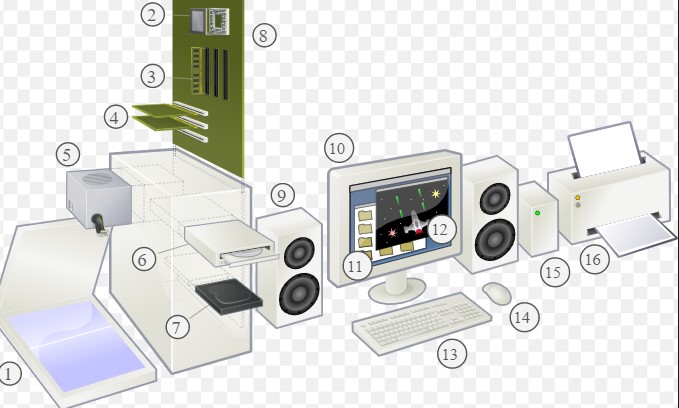
Parts of a computer: You should understand some of the basic elements that make up a computer including:
‐ Central processing unit (CPU)
‐ Types of memory
‐ The hard disk
‐ Input and output devices


CPU: 
The CPU (Central Processing Unit) is normally an Intel (or equivalent) and it is one of the most important components within your computer. It determines how fast your computer will run and the CPU speed is measured by its MHz or GHz speed. Thus, a 2 GHz Pentium is much faster than say a 1 GHz Pentium CPU. It

is the CPU which performs all the calculations within the computer, when running programs such as word-processors, spreadsheets and databases. The CPU contains following elements. 


Control Unit: The control unit is responsible for controlling the sequencing and timing of the other elements making up
the CPU.

Arithmetic Logic Unit (ALU): The ALU performs the mathematical calculations using data stored within the CPU registers.

Registers: The registers are memory storage areas within the CPU that hold the data that is worked on by the ALU.

BUS: The computer bus transports data between the memory and registers.

Memory (RAM): 
The RAM (Random Access Memory) within your computer is where the operating system is loaded to when you switch on your
computer and also where your applications are copied to when you
start an application, such as a word processor or database program.
When you create data, (e.g. letters and pictures), these are initially
created and held in RAM and then copied to disk when you save the data. As a rule of thumb, the more RAM you have installed in your computer the better. These days you will commonly find over 512 Megabytes of RAM installed.

ROM‐BIOS: 
The ROM‐BIOS (Read Only Memory ‐ Basic Input Output System) chip is a special chip held on your computer's system (mother) board. It contains software which is required to make your computer work with your operating system, for instance it is responsible for copying your operating system into RAM when

you switch on your computer.

Disks: 
You use disks to store any data that you create. This can range from a memo created within a word processor to a video file created using a video camera. There are many different types of disk.

The Hard (Fixed) Disk:  Hard disks are the main, large data storage areas within your computer. Hard disks are used to store your operating system, your application programs (i.e. your word
processor, games etc) and your data. They are much faster than CD/DVDs and can also hold much more data. Hard disks are installed within the system unit of your computer.
Input/output ports:  The Input and Output ports are normally located at the back or on the side of your computer. These
include ports such as USB, serial, parallel, network and FireWire ports. You plug cables into these ports to connect your computer to other devices, such as printers, scanners and cameras.

Universal Serial Bus (USB) Port: 
The Universal Serial Bus is a relatively new item within the PC. You will see one or more USB sockets at the back of the system unit, allowing you to plug in devices designed for the USB. These devices include printers, scanners and digital cameras. Memory sticks can also be plugged into a USB port allowing you to copy data to or from your hard disk.

Serial Port:  The serial port is a socket located at the back of your computer which enables you to connect items to the computer, such as a modem. They are commonly labelled as COM1 or COM2.

Parallel Port:  The parallel port is a socket located at the back of your computer which enables you to connect items to the computer, such as a printer. It is commonly labelled as LPT1 or LPT2.


NOTE: The parallel port used to be the main way the computer connected to a printer. These days you are more likely to use a USB cable to connect the computer to a printer.


Network Port: 
The network port allows you to plug a ‘network cable’ into your computer, which then lets you communicate with other computers connected to your local network or to other computers via the Internet.


FireWire Port:  FireWire is an interface from Apple Inc. that allows high data transfer between your computer and a compatible device such as a digital camera. FireWire has largely replaced earlier ways of transferring data, such as parallel or SCSI cables. There are numerous versions of FireWire including fibre optic, coaxial and wireless versions. Most multimedia computers will have FireWire ports built into them. Firewire connectors usually look like this. 


Read More

Wednesday, July 17, 2019

Common handheld portable digital devices | Personal Digital Assistant (PDA)

Posted by Bit Version
Personal Digital Assistant (PDA)  These devices use a special pen, rather than a keyboard and can be used for storing and retrieving information. Like most computer devices, many can connect to the Internet. They are extremely compact. PDAs have many built‐in features such as a calculator, a clock and a calendar. Many allow you to send and receive emails and even browse the web.

PDAs can also be used for accessing the Internet, sending and receiving e‐mails, video recording, typewriting and word processing, use as an address book, making and writing on spreadsheets, scanning bar codes, playing computer games, recording survey responses, and Global Positioning System (GPS).


Newer PDAs also have both colour screens and audio capabilities, enabling them to be used as mobile phones (smartphones), web browsers, or portable media players. Many PDAs can access the Internet, intranets or extranets via Wi‐Fi, or Wireless Wide‐Area Networks (WWANs). Many PDAs employ touch screen technology.


Capacity: Much smaller storage capacity compared to a PC.
Speed: Much less than a PC unless you pay a lot extra.
Costs: In relative terms expensive when compared to a PC.
Typical Users: Mostly business users.


Read More

Laptop/Notebook & Tablet PC

Posted by Bit Version
Laptop computers, as the name implies, are small portable computers which can run on batteries as well as mains power. They use special screens, rather than the traditional bulky monitors, which allows for longer battery life as well as portability. A newer term, “Notebooks”, simply indicates a VERY small laptop. These are especially popular with salespersons on the move or people giving presentations. While they tend to still be more expensive than an equivalent Desktop computer, they can now match the power of a Desktop computer. Palmtops are even smaller computers which can literally fit into the palm of your hand. 


Capacity: Large hard disks combined with a
large working memory (RAM) – Often less powerful than for a PC of equivalent price.

Speed: Fast. Normally measured in GHz. Often speed specifications are less than for a PC of equivalent price.

Costs: Components need to be much more compact, so there is a price overhead when compared to a PC of equivalent power.


Typical Users: Business users, people on the move, educational users.


Read More

Monday, July 15, 2019

What is Apple computers ?

Posted by Bit Version
The Apple Mac is a PC. It uses a different operating system, and may require special versions of application programs (such as word processors or spreadsheets). Even the hardware add‐ons have to be customized to some extent to be able to be connected to a Mac In the early days the thing which really distinguished the Mac over the IBM PC was the GUI (Graphical User Interface), or in plain English the way you could use the mouse to drive the computer. In the early days of the PC, you really had to be a bit of an expert to use and maintain your PC. Recently the differences between the IBM PC and the Mac have blurred, with Microsoft buying a stake in Apple. 

 
Read More

Saturday, July 13, 2019

What is the Personal Computer?

Posted by Bit Version
A personal computer (PC) or micro‐computer is any general‐purpose computer whose size, capabilities, and price make it useful for individuals, and which is intended to be operated directly by an end user who may not have specialized computing skills or knowledge. This is in contrast to large expensive mainframe or minicomputer systems designed for use by many people, usually at the same time, or large data processing systems which require specialized staff to operate efficiently. A PC may be a desktop computer, a laptop, a tablet PC, or a handheld PC (also called a palmtop).The PC industry began in 1977, when Apple, Radio Shack and Commodore introduced the first off‐the‐shelf computers as consumer products. Prior to this, computers were generally found in universities and laboratories only.

IBM introduced the IBM PC in 1981. Since then, the PC market has been dominated by two types of PCs –IBM PC Compatibles and computers produced by Apple. IBM PCs and its compatibles are computers based on CPU's built by Intel and run Operating Systems know as Windows (other OS are also available for IBM PC Compatibles, e.g., Linux). Apple has its own hardware and OS.

Capacity: Large hard disks combined with a large working memory (RAM)
Speed: Fast. Normally measured in GHz.
Costs: Getting cheaper by the day.

Typical Users: Home users, large and small office users. Education, Doctors. In fact just about everyone needs to know how to operate a PC these days.
Read More

Friday, July 12, 2019

What is Hardware in Computer ?

Posted by Bit Version
Hardware: 
 
The term hardware refers to the physical components of your computer such as the system unit, mouse, keyboard, monitor etc.In other words, hardware are things you can physically touch.


Read More

Tuesday, July 31, 2018

What's New in Camtasia 2018? - latest version | Camtasia 2018

Posted by Bit Version

Camtasia is one of our preferred editing tools for video content growth. We also distinguish it’s one of your favorite tools besides. Newly, Tech-Smith released Camtasia 2018. Through pristine and updated features, there’s a lot of thought-provoking stuff to bar into.


We investigate what’s remained added and created a walk-through of what Camtasia 2018 has to suggestion. If you’re previously recording and editing videos, we’ll let you know if 2018 is value the promotion. Or if you’re in the marketplace for new video software, learn if Camtasia 2018 will effort for you.

1. Earlier reduce period
A statement that many editing content creators will be happy about, Camtasia 2018 hearsay's having quicker video translation time, up to 60%.

This is unquestionable to save creation time on your content by plateful you get it available quicker.

2. Establish your possessions with libraries
A big plus that has been updated for PC users and added for windows & Mac users is libraries.

This is an appreciated totaling as you only must upload your properties once, residence them in a folder and you’ve got all you need to create content that is steady with your product. From intros to icons to music, you can keep everything together, ready to be reused.

3. Make themes that characterize your product
Additional handy totaling to make quicker contented, themes enable you to choose colors and fonts and save them for future use.

Read More

Wednesday, May 23, 2018

About Adobe Photoshop | Adobe Photoshop is a Very Powerful Computer Software

Posted by Bit Version

Photoshop is a very powerful and powerful computer application. To make it easier to work in Photoshop, its various versions of this system are being used more frequently. Are you not using Photoshop now? You might think that you cannot buy Photoshop Paid so you cannot buy? No problem, Download Adobe Photoshop CC 2017. There are 30 days of trial available here. 30 days for the best time to learn the trial of Photoshop. [Note: Photoshop can be used for cracking, so it can be used without having to pay Photoshop Paid. But this tune is not about how to crack Photoshop. Here are the basic themes of Photoshop. Cracking Photoshop by clicking on other Tune or YouTube videos.]


We've heard about Adobe Photoshop's name. But many people do not know its exact work or use. When you do graphics designs on the Internet, Adobe Photoshop will help you to do graphics design work. Apart from Adobe Photoshop, you can do the following:
  • ·         Different types of pictures are designed
  • ·         Webpage ready
  • ·         Advertisements, posters, leaflets, etc. can be made beautifully
  • ·         Publication
  • ·         Multimedia
  • ·         Create graphics online
  • ·         It is very much needed for multimedia, web-page, online graphics design


Click Download button now will let you start Adobe Photoshop CC 2017


Read More

Monday, May 21, 2018

Notepad++ Download

Posted by Bit Version

Notepad++ Download current version is an accomplished, complete structures concerned with text editor that all Notepad wants though what fixes nonexistence (it can supplant Notepad in Windows). It boosts 27 programming languages, pursues typical languages, and supports syntax stress and failing, coordinated opinions and excision’s, and various additional.


It’s moreover a lightweight switch of Notepad. The boosted languages by Notepad++ are C, C++, Java, C#, XML, HTML, PHP, JavaScript, RC record, make file, NFO, doxygen, INI document, cluster record, ASP, VB/VBS, SQL, Objective-C, CSS, Pascal, Perl, Python, Lua, Unix Shell Script, FORTRAN, NSIS and Flash activity script.
 
Following are the best itemized structures of Notepad ++…….
  • ·         Highlight Code based on Your Chosen Language
  • ·         Complete Syntax Highlighting
  • ·         Intelligent Auto Complete Function
  • ·         Open Multiple Documents in Notepad plus tabs
  • ·         Record Some Tasks and Automate
  • ·         Command Line Execution with Arguments
  • ·         Support Multiple languages
  • ·         Syntax Folding Based on Code Tags
  • ·         Regular Expressions Search & Replace
  • ·         Zoom in Zoom Out Function
  • ·         Very light weight and fast performing


Click Download button now will let you start Notepad++ Download

Read More

Sunday, May 20, 2018

Free Download NetBeans

Posted by Bit Version

NetBeans is an open source licenses, Java based integrated development environment (IDE) that agrees makers to make Portable, Mobile, Desktop, and Web Applications. It’s a free IDE that processions combined support for developed with several languages counting Java, CSS, PHP, HTML, and C++, etc. The software accepts a modular building with a great set of tools that support the complete development series right from development beginning to app deployment. Closely every meaning in NetBeans occurs finished units intended to control and range all its skills.


NetBeans is planned to suggestion a keen and wild method for developers to code. The application delivers healthy cipher analyzers, converters, and publishing supervisor that exhibition provision for the up-to-date Java skills. The topographies let creators to rapidly and naturally promotion applications to use the leading-edge Java 8 language hypotheses.


The resolution delivers cross-platform sustenance which resources it can be installed on Windows, Linux, and Mac OS X stages. Operators can inscribe their code once and run them anyplace. Additional pleasant quality is its greater support for many languages. With NetBeans, PHP and C++ developers enjoy the suitability of complete tools and publishing supervisor for all the linked machines and bases for PHP, XML, HTML, JSP, JavaScript, Javadoc, and Groovy.


The cross-platform building resources that this IDE can perfectly run on Windows, OS X, Linux, and other UNIX based Going systems. NetBeans is the authorized IDE for Java 8 with powerful code analyzers, converters, and editors. In addition, the solution has a universal public of lively users and developers.

NetBeans Technical Setup Details
Given below Technical Details for NetBeans Setup will help you to start and successfully complete the NetBeans Free Download and once downloaded then install in to your PC by following the details.

Full Name: NetBeans
Version: 8.0.2
Name of Setup File: netbeans-7.4-windows
Full Size of Setup File: 203MB
Friendly with:  Windows 98/Me/NT/2000/XP/Vista/7/8/10/OS X/Linux


NetBeans Free Download
Given below button of Download Now will let you start NetBeans Free Download and experience the astonishing features of NetBeans.


Read More

Wednesday, May 16, 2018

Best Android emulator on Windows 7/8/8.1/10

Posted by Bit Version
Android running on Android is possible by various methods, which differ in complexity of the initial settings, function and performance. Why do you need an Android emulator? - Most users "just to see" for the average user, Developers of the same mobile application use it for their extensive testing of programs. But to run the Windows Android game they are already aware of all the possibilities. However, if you want to download your Android emulator and try to run apps and games in Windows 10, 8.1 or Windows 7, here you will find different ways of doing this.


Koplayer: Koplayer - makes use of Android applications and games on your laptop or tablet with your PC or Windows easily through another free emulator. Just like the previous version, Koplayer has been very similar to a relatively low-priced system, similar settings, including recruiting the amelor amount of ammunition. The most fun thing in this program - which can be determined the key gesture for the action of the Android screen, accelerometer, is very convenient for tuning keyboard kazhoy games, click on the separate area of the screen.


Koplayer is a free and very easy emulator, which only has the most basic functions, which allows you to run games for Android on a computer by running Windows. Settings, interfaces and functionality are functionally the same as other emulators; You can use the downloaded APK files from the official store and you can allocate application memory automatically. The unique feature of this emulator is the ability to protect the game keyboard. In the keys, you can do a variety of things, clicking on the screen and touchscreen motions, imitating the work of accelerator and more Each setting can be separated for each individual game. You can download koplayer from official site.
Official site link: http://www.koplayer.com/

Watch this tutorial to install : 

Read More

Monday, May 14, 2018

Free Download Shotcut 18.05.03 Video Editing Software

Posted by Bit Version

Shotcut is a video Editing Software this update version Shotcut 18.05.03 Free Download for Windows supporting in cooperation 32 bit and 64 bit styles. Setup file is totally individual besides also its a disconnected installer.


Analysis of Shotcut 18.05.03 Video Editing Software
Shotcut is an open foundation and free movie editor. It simplifies a great quantity of movie categories. Additionally, it simplifies its users by provided that numerous video editing geographies and their inter-conversions.  Additionally, It’s a quite serious video editing application. Also its user line is reasonably modest, gorgeous and worker sociable. Even a non-technical user can simply use its main geographies with taking any problem. Furthermore, core monitor comprises superior quantity of tools in list which makes comfort for its users to use any and complete the looked-for function.


Greatest Geographies of Shotcut 18.05.03
You can also knowledge succeeding core geographies after performance the Shotcut 18.05.03 Free Transfer.

  • ·         Uses FFmpeg which supports sundry video setups and codecs for repetition and video translation
  • ·         Network watercourse replay (HTTP, HLS, RTMP, RTSP, MMS, UDP)
  • ·         Effort and droplet records to video editor
  • ·         Video screens: Blur, Color Grading, Crop, Glow, Mirror, Saturation, Sharpen
  • ·         Group video adaptation
  • ·         Create, play, edit, save, load, encode, and torrent MLT XML playlists
  • ·         Limitless unbutton and redo and antiquity view
  • ·         Capture (record) SDI, HDMI, webcam (V4L2), JACK, PulseAudio, IP streams, X11 screen


You can start Shotcut 18.05.03 Free Download just by a single click on Download Now button.

Or Officially Website  Click Here: Official Website  


Read More

Wednesday, January 25, 2017

Download BlueStacks Latest Version

Posted by Bit Version
Have you ever attention of using those Android apps on your Windows 10/8/8.1/7 PC?Just think of using your favorites Android apps like WhatsApp, Candy Crush Saga, Clash of Clans, Snapchat, Shadow Fight 2 and much more on your Windows Personal Computer or in Laptop.  If you are thrilled about using these apps on those smaller screens, then you will be astonished when you use these apps on the better screen of Windows Desktop or Windows Laptop. In this article, I will let you know about how to install android apps on PC/Laptop using BlueStacks App player. So, first we will let you know what BlueStacks is, and I will tell you how to bluestacks downloadfor free in Windows Computer.


BlueStacks is the software which allows us to download and install Android apps on your Windows Laptop/PC for free. However, it allows you to install free android apps on your PC and not paid Android apps. I got what you were thinking. Yes, you can install Clash of Clans on PC, WhatsApp for Laptop, Candy Crush Saga for Personal Computer, Shadow Fight 2 for Computer and much more Android apps on your Windows desktop for free. First downloadbluestacks, download bluestacks latest version, Using BlueStacks online installer is a bit problem when you have the week internet connection and the slow internet speed.

download bluestacks latest version

 downloadbluestacks 2


By using the BlueStacks Offline Installer for PC, once you are done with downloading the necessary executable file, you can copy that to any system, or you can install BlueStacks on your PC at any time. Installing the downloaded file does not require an internet connection, and it can’t be installed offline. It is very easy to download BlueStacks for free, and it is also genuine. After downloading and installing the BlueStacks in your Laptop/PC, you can search and install any free Android app for PC within seconds. Bluestacks can’t be copied to any other PC. Now, you can go ahead with installing Android apps directly on your PC.

Read More

Tuesday, December 27, 2016

Download code blocks

Posted by Bit Version
Codebloks is a free, open-source; cross-platform C, C++ and Fortran IDE build to get together the most challenging wants of its users. It is planned to be very extensible and fully configurable.


Finally, an IDE with all the skin you need, having a reliable look, feel and function across platforms.

Code blocks for windows Features:
Code Blocks Latest Version!
Works with All Windows versions
Code blocks compiler
User’s choice!

Many improvements, new plunging and features, extra stable and chief code compiler development, the new Code blocks make public has lastly inwards. Get it from the download code blocks section!

Special credits go to dammar for his great work on the Fortran Project plunging, bundled in view of the fact that release Code blocks 13.12.

 download code blockscode blocks free downloadcodeblocks downloaddownload codeblockscodeblocks for windows


We hope you enjoy using codebloks!
Read More

Saturday, November 26, 2016

File Transfer Software

Posted by Bit Version
Are you looking File Transfer Software for Your PC or Laptop? Then you can click here to flashget free download, free file transfer software, flashget download, download flashget, get download, and shareware and programs. Flashget full version can crack downloaded files into sections, downloading each section at the same time, for an increase in downloading speed from flashget file transfer. This, coupled with FlashGet’s great and easy-to-use organization features, helps you take control of your free file transfer.  Flashget is best file transfer programs, FlashGet can call antivirus automatically to clean virus, spyware and adware after free download files into sections and supports multipoint transfers in matching. Want faster downloads and easier management of downloaded files? FlashGet. Home · file transfer protocol software and Networking; FlashGet 3.7.0.1220. So FlashGet is a freeware download manager for Microsoft Windows. It was originally available in file transfer software download.  


flashget free download

free file transfer software

flashget download

download flashget

get download


Read More

Monday, November 7, 2016

Free Download Mathematica 5.0 software full version with KeyGen

Posted by Bit Version
Mathematica 5.0 is even additional forceful for OR professional who have been intrigued by Mathematica software in the past but did not think it to be a everyday package for their work. This version of the software introduces numerical analysis, linear programming and matrix operation with fast algorithms that battle with dedicated numerical software tools.  


The program's installer files are normally found as setup.exe, etc. In similarity to the total number of users, most PCs are operation the OS Windows 7, 8, 8.1, 10.

Info:
  1. 1. Download the Mathematica 5.0 Installer and Crack above.
  2. 2. Download the crack firmware, Install it. Install this before you install the Crack.
  3. 3. Install the Mathematica 5.0.
  4. 4. After installing it do NOT open the Mathematica 5.0 yet, first you must copy and paste the Mathematica 5.0 crack to the folder where you have installed the file.
  5. 5. After copying the crack to the folder, open Mathematica 5.0 and enjoy using it.
Or 


Read More

Saturday, November 5, 2016

Free Download FastStone Capture 8 Full with serial key

Posted by Bit Version
FastStone Catch is really helpful, light-weight, though, filled feature show catch device as well as display movie recorder. This enables you to extremely simply catch as well as make notes on amazing about the display such as home windows, items, selections, absolute display, four-sided figure shaped or freehand or set areas in addition to scrolling home windows or web pages.


FastStone Catch is also allows you to record all screen actions as well as onscreen changes, talking from microphone, mouse actions and clicks into highly solid video library. You can decide to send captures to editor, file, clipboard, printer, email, Word / PowerPoint document or upload them to your website. Editing tools comprise annotating texts, arrowed lines, places of interest, resizing, cropping, sharpening, watermarking, applying edge effects and many more. Other features include image scanning, global hot-keys, routine filename making, support for outside editors, a color picker, a screen magnifier, a screen crosshair and a screen leader.


It saves images in BMP, GIF, JPEG, PCX, PNG, TGA, TIFF and PDF formats. integrated screen recorder saves videos in WMV (Windows Media Video) format.

Record screen actions include onscreen changes, speech from microphone, mouse movements and clicks into highly solid video files (Windows Media Video format). A built-in video editor allows you to draw clarification, apply zoom effects and cut useless sections. It even allows you to convert video files to animated gif files.


Read More